
Simple Download Monitor plugin
Simple Download Monitor is my first attempt at creating a WordPress plugin. I wrote it because I wanted to monitor the number of downloads of my files without having to maintain any kind of database or making any special download links. I just wanted to upload a file to a designated directory using FTP, provide a direct link to it and once in a while check the number of downloads. And this is pretty much what Simple Download Monitor does, with some slight additions, such as recording referers and username of people who download my files.
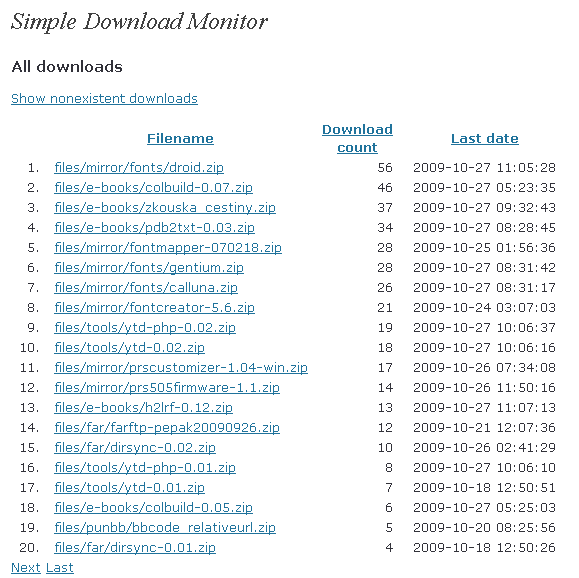
Main statistics
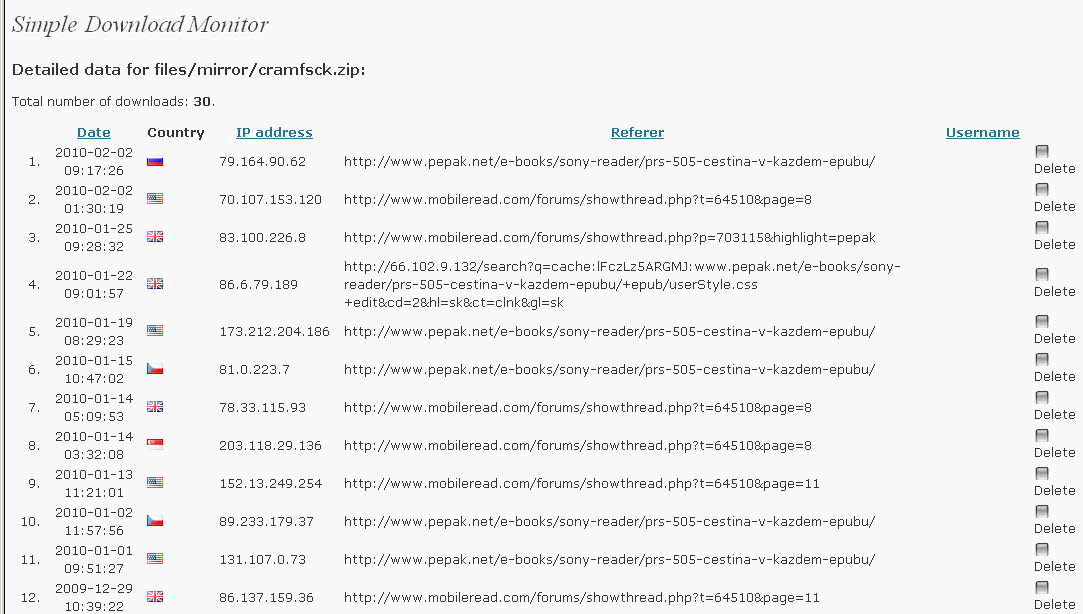
Detailed statistics for a chosen file
Installation
-
Create a subdirectory in your
/wp-content/plugins/directory and extract the plugin there. The plugin subdirectory can be anything you like – I usesimple-download-monitor, but the plugin should accept any name. -
Activate the plugin through the Plugins menu in WordPress.
-
You will see a Simple Download Monitor item in your Settings menu. You can enter three options there:
-
Allowed directories. The plugin could potentially be a huge security hole because it could be used to download source files of your site (e.g.
config.php– you definitely don’t want to allow that!). This option restricts Simple Download Monitor to directories matching a regular expression. The default value offiles/means that Simple Download Monitor will only allow download of files in the/filesdirectory and its subdirectories. -
Allowed extensions. Much like Allowed directories, allowed extensions protect your site’s files from unwanted downloads. It is a regular expression too and it is recommended to only place „safe“ extensions such as
ziporjpghere. Do not EVER allowphpextension, either directly or through wildcard (such as.*– that is a BIG NO-NO!). -
Store detailed info. If this option is checked, detailed information about each download (such as referer, user’s IP address or name, and date of download) is stored. This could fill your database quickly if you have a well-visited site so you can turn detailed info off and only keep the number of downloads and the date of last download.
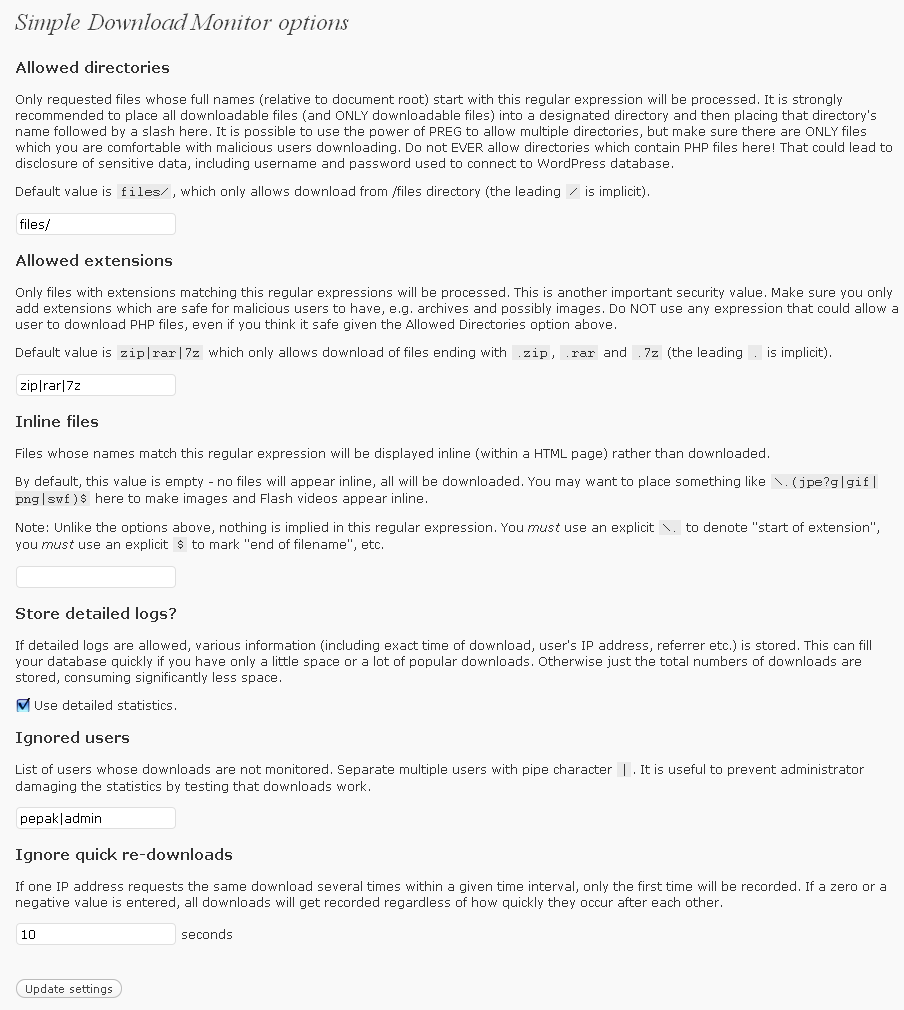
Plugin options
-
-
The last step involves editing the
.htaccessfile. The default.htaccessskips default WordPress processing for existing files, which means that direct-linked files would get downloaded directly, without Simple Download Monitor ever learning about it. You need to modify the.htaccessfile so that downloads are passed through Simple Download Monitor.This is easy enough to do: Open your
.htaccessfile and locate line:RewriteCond %{REQUEST_FILENAME} !-fAdd this line directly above it:
RewriteRule ^(files/.*) /index.php?sdmon=$1 [L]
(replace ‚files/‘ with your download directory).
Downloads
- The newest version at WordPress.org
- Simple Download Monitor v0.24 (2013-10-17, 122 KB). The last version developed by me – the next version will be created by a new programmer. This version is just means to inform the users of this change.
- Simple Download Monitor v0.23 (2012-09-04, 122 KB). Support for more detailed error messages. Possibility of moving the Files directory outside of WordPress directory tree.
- Simple Download Monitor v0.22 (2012-07-15, 119 KB). Support for an intermediate download page (when you click a link, an information page appears, and only from there the download commences).
- Simple Download Monitor v0.21 (2011-05-16, 116 KB). A fix for the WordPress 3.1 „feature“ which required a manual deactivation and reactivation of the plugin.
- Simple Download Monitor v0.20 (2011-05-15, 124 KB). No change in the code, but added an explicit „You need to deactivate and reactivate the plugin after upgrade“ to the documenation.
- Simple Download Monitor v0.19 (2011-05-15, 124 KB). Support for sidebar widget. Support for download limit per IP address. Small bug fixes (filenames with spaces in them).
- Simple Download Monitor v0.18 (2010-12-14, 118 KB). Compatibility fixes: SDMon crashed on large files if W3 Total Cache was active; SDMon crashed if a hosting provided the fileinfo extension but didn’t use PHP 5.3.
- Simple Download Monitor v0.17 (2010-11-06, 117 KB). Ability to specify iser rights required to access various plugin functions.
- Simple Download Monitor v0.13 (2010-07-10, 308 KB). Various cosmetic fixes – 24-hour time display, better paginator, official support for WordPress 3.0, handling of forbidden files as nonexistent.
- Simple Download Monitor v0.12 (2010-03-28, 292 KB). Support for geolocation of users. Ability to not monitor certain users (e.g. administrator). Ability to not monitor multiple simultaneous downloads of one file from one IP address (such as when the user uses a download accelerator).
- Simple Download Monitor v0.11 (2010-01-24, 67 KB). Compatibility PHP 4. Belarussian translation by Antsar.
- Simple Download Monitor v0.09 (2010-01-10, 50 KB). Fixed incorrect header for file length. Support for resumed transfers.
- Simple Download Monitor v0.08 (2009-11-29, 48 KB). Support for deleting unwanted stats.
- Simple Download Monitor v0.07 (2009-11-24, 47 KB). Allows monitoring of inline content (e.g. show downloads of images embedded in your pages).
- Simple Download Monitor v0.06 (2009-10-29, 43 KB). Fix for a crash if no downloads were recorded.
- Simple Download Monitor v0.05 (2009-10-28, 43 KB). The first public version.



Chas: I am not sure what you mean. When I was developing the plugin, there was no standalone download page and counter were only available as either sidebar widget or in logged-in user’s menu. The sidebar wasn’t required to make downloads count. I have since then passed development to another person. If he added the counter functionality, I know nothing of it.
IS there a way to log the downloads and count them without the counter showing on the download page?
jcgr: I don’t think that’s caused by SDMon, it should only depend on the browser setting. Provided that you didn’t add the extensions to the „Inline“ list.
sorry, wrong url. Here it is: http://fathalf.com/face-control/
I’m trying to use the plugin at http://fathalf.com/subscribed-audio-books/, but when user clicks the „download now“ button, it just plays the audio file, rather than downloading it to their computer. Am I doing something wrong?
jayRO: Thanks!
Took me a couple hours with IIS web.config syntax, maybe this will help somone else. Configuration is to use „Custom URL“: http://example.com/ |downloads/| |Filename|
Snip from web.config:
<rewrite>
<rules>
<rule name=“Rewrite to sdmon“>
<match url=“^downloads/([^/]+)$“ />
<action type=“Rewrite“ url=“wp-content/plugins/download-monitor/download.php?id={R:1}“ />
</rule>
<rule name=“wordpress“ patternSyntax=“Wildcard“>
<match url=“*“/>
<conditions>
<add input=“{REQUEST_FILENAME}“ matchType=“IsFile“ negate=“true“/>
<add input=“{REQUEST_FILENAME}“ matchType=“IsDirectory“ negate=“true“/>
</conditions>
<action type=“Rewrite“ url=“index.php“/>
</rule>
</rules>
</rewrite>
NOTE: I had to put the sdmon rewrite rule before the wordpress rule.
I went into the htaccess file and compared it to an old backup I had and you were right, for some reason the SDMon was removed. I’ve added it back and it is tracking again. THANK YOU!!!! =D
Dennis: No change in the plugin itself, but it is possible that either WordPress or some other plugin modified the
.htaccessfile and disabled SDMon by that. Check the.htaccessfile to make sure it contains the code that you added as part of the SDMon installation.Hello,
Awesome plugin! I was running v0.11 for the longest time and earlier this month I upgraded my wordpress and the plugin. I believe the tracking of the downloads stopped completely. I tried testing by downloading again myself on different machines and logged off WP. The last tracked date of downloads was around the time I upgraded. I’m now on WP 3.7.1 and v0.24 of this plugin. Is there something else I need to do to get it to start tracking the downloads again?
Thanks
Version 0.24: The last version developed by me – the next version will be created by a new programmer. This version is just means to inform the users of this change.
@pepak: Thanks for the swift response! Seemed as if the files just needed a download to „refresh“. Just downloaded each of them once and — viola! — now they are all back and appearing on the sidebar with the right number Couldn’t be more easy!
danny: „Nonexistent“ is simply a flag in the list of files. What you describe could be caused by a change in the directory structure – when a file is accessed, SDMon checks whether a file exists and updates the flag accordingly. But only the files which someone attempted to access get modified this way, there is no „full update“ of all the files. Which could be why you are seeing no pattern in the changed files.
What you need to do is to find out why your files are seen as „non-existent“, change the relevant setting and then try to download the „non-existent“ files to update the settings. Findint the reasons for non-existence might be difficult, I would put a
die('Filename: ' . $fullfilename);on line 308 in simple-download-monitor.php, try to download something and check the filename that will display instead of the download – I expect there will be multiple slashes where one slash should be, or an extra space within the path, or something like that.Hi! First of all — thanks for the great plugin! It is exactly what I wanted and it worked perfectly, until now. I just installed the WP updates and now SDMon shows some strange behavior. Half of my downloads is „gone“ and now listed under „Show nonexisting downloads“ . Can’t see any pattern behind which downloads are effected and which aren’t. Any ideas?
Buc: The inverted view is probably too specialized to get implemented. IMO requirements like this are better handled by ad-hoc database queries, e.g.
SELECT r.download_date, r.referer, h.filename FROM wp_sdmon_details r JOIN wp_sdmon_downloads h ON h.id=r.id WHERE r.ip='1.2.3.4'.The timestamps are generated by the database server, and so they use the DB server’s time. I guess I could provide an option for setting „delta“ time, e.g. in your case +8 hours, but it would be better if you first investigated the possibility of setting your DB server to the correct time zone.
Hi, I’ve installed your plugin a few days ago and I like it: good job man 😉
I’d appreciate an inverted view too. I’ll explain it: starting from the IP address, i’d like to know what was downloaded from that IP address. But that’s just „something more“.
My point currently is that all download’s timestamps are shown wrong (I think UTC-7, but that’s an approximation by 1 hour, I didn’t investigate on it). I’m in UTC+1 zone, and my WordPress is set so.
Am I doing something wrong?
Thank you.
Možná se mělo zdůraznit, že adresář files/ je vzhledem k root webu, tedy adresáře s index.php, já tam dával adesář počínaje /home/…/files/ a nefungovalo to.
fe: My opinion is that you would get very little additional information (basically just „there is a file X“) at a serious cost (the list of files cannot be cached, due to the way SDMon works, so it would have to be recalculated for every display).
Thank you for the plugin – works perfect, but I’m little confused because in statistics are shown only files which has been accesed/dowloaded at lease once. More User Friendly will be show all files in /files folder which met regexp with zero counter basicly.
Kelly Johnson: Not at the moment. Two reasons: 1) I don’t know how to create Dashboard widgets. 2) I don’t know what to display. But if you can solve 2), I can try to solve 1).
Great way to track file downloads!!! Is there anyway to add a widget to the dashboard?
Thanks. pepak
I finally have discovered that is the cause of the error ‚StatPress Reloaded‘. It was very hard to check to stop one by one all the plug-ins in use. Download Counter is now working well. I replaced the ‚WP SlimStat‘ plug-ins for access analysis.
ichihirox: At least one of your plugins or themes is producing an output where it shouldn’t. You will need to disable that plugin/theme; turning on output buffering, which is a usual response to these errors, would probably lead to corrupted downloads. (Note that the output produced will likely be a space or several, or a newline, or some similar „invisible“ output.)
Hi,
I installed to wp3.4 on osX server for count pdf catalog.
I added to .htaccess below according to the instructions.
RewriteRule ^(pdf/.*) /index.php?sdmon=$1 [L]
Clicked down load link, I got The following message and pdf source displayed in the browser. The count is performed in this state.
RewriteRule option [L,QSA] was same.
Can I have any solution ?
Warning: Cannot modify header information – headers already sent in /Library/WebServer/Documents/www/wp-content/plugins/simple-download-monitor/simple-download-monitor.php on line 268
Warning: Cannot modify header information – headers already sent in /Library/WebServer/Documents/www/wp-content/plugins/simple-download-monitor/simple-download-monitor.php on line 269
Warning: Cannot modify header information – headers already sent in /Library/WebServer/Documents/www/wp-content/plugins/simple-download-monitor/simple-download-monitor.php on line 270
Warning: Cannot modify header information – headers already sent in /Library/WebServer/Documents/www/wp-content/plugins/simple-download-monitor/simple-download-monitor.php on line 272
Thanks pepak
The link using directly SDMon works perfectly and I have tried again with
.htaccessand now work fine (a possible mistake) 🙂Thanks again
cadetill: The error message looks like an error in your theme, not in SDMon.
Anyway, you can try to use link http://www.cadetill.com/index.php?sdmon=files/gmlib_0.1.9.zip instead of http://www.cadetill.com/files/gmlib_0.1.9.zip. That will completely bypass the
.htaccessfile and run SDMon directly. If it succeeds, then your.htaccesssettings are incorrect. If it fails, your configuration settings for SDMon are incorrect. (Note that for security reasons SDMon doesn’t tell you which check failed; all lead to the same error message. If you want to discover which setting is causing you trouble, you will need to editsimple-download-monitor.phpand print progress status – e.g. by placing adie('1');ordie('2');in both branches of anifstatement – then if you see a 1 printed out, you know SDMon took this branch and not the other.)Hi.
First of all, thanks for your job.
I have installed and configured the plugin and I have modified the .htaccess file but when I try to download something I get this error message:
Warning: Invalid argument supplied for foreach() in /home/cadetill/domains/cadetill.com/public_html/wp-content/themes/suffusion/custom/seo.php on line 40
Simple Download Monitor error
Requested file files/gmlib_0.1.9.zip not found.
But the file exist in this folder (if I deactivate the pluggin, I can download it without problems)
Can you help me? Thanks in advance
Regards
cadetill
Haris Nadeem: Re: link: I think this is a bug/feature of Firefox. It really sticks in a loop, even my Firefox. But if I lose patience and click on the link („If it does not, click here“). it starts to download just fine. That signifies Firefox does something strange when using meta refresh, but doesn’t do the same thing when the user actually clicks. I actually noticed the same behavior in Opera, but that was easily solved – my Opera is set up so that it doesn’t provide websites with a referer, which is checked by my plugin before the download starts. Once I enabled the referer, downloads worked even in Opera if I clicked the „click here“ link. That means the problem is definitely client-side.
I did some more testing and I think the behavior you see is caused by a combination of two bugs. One is in Firefox, the other might be in SDMon, but more likely either in your webserver, or maybe in some other plugin which interferes with the process.
The Firefox bug: Firefox apparently does not set a referer when following
meta refreshtags. All other browsers do, and I consider their behavior the correct one. In any case, when the referer is set to the intermediate page (the one with „if it doesn’t, click here“), SDMon correctly kicks in and sends the download. The fix would be up to the Firefox developers.The other bug: The
?download=truepart of themeta refresh‚s URL should guarantee a proper download even without a referer. But it doesn’t (on your server – it does on mine), as I verified with Opera set to not send a referer. Which means that the?download=truepart never reaches SDMon. Why it never reaches SDMon is the question. I can see three possible causes:1) SDMon’s rewrite rule in the
.htaccessfile is incorrect and actually eats up the?download=truepart. I am not nearly expert enough to tell whether that is correct. I don’t think so, but I can’t discount the possibility. In that case the fix would be in SDMon, but someone would have to tell me how to fix it.2) Your server is incorrectly handling the rewrite rule and while it does redirect the requested file itself to
/index.phpwhere SDMon can get it, it leaves off the?download=truepart. In that case the fix should come from the server, but I guess that is unlikely to expect. But you could change the intermediate download page (download-example.phpis the default one) so that it doesn’t send requests to/${sdmon_filename}?download=true(line 9) or/<? echo $filename; ?>?download=true(line 21), but rather to/index.php?download=true&sdmon=${sdmon_filename}or/index.php?download=true&sdmon=<?php echo $filename; ?>respectively. That should completely bypass the.htaccessfile and request the download directly.3) Some other plugin is eating up the
?download=truepart. You can check this out by disabling the plugins one after another until you find the culprit. Then either request a fix from that plugin’s developer or modify SDMon so that it doesn’t use?download=truebut, for instance,?xyz=123.—
Re: compatibility: I have no idea. I don’t think I am using any special functions or have any special requirements, but the #2 possibility above could well be due to a server’s incompatibility with how Apache handles things. But any server-incompatibility should result in a file not being downloadable at all rather than not being counted (although, come to think of it, if the
.htaccessrules never got executed at all, that could account for the behavior you describe. You could check that easily by insertingdie('***');before line 428 and trying to download a file – you should get a more-or-less blank page with three asterisks somewhere in it, but if instead the download starts, then your webserver is ignoring SDMon’s.htaccessrules and uses direct downloads.pepak: If you try this download link in Firefox, it will get stuck in a loop and will not download the file: http://apk.teamandroid.com/files/haris.apk
And, is this plugin fully compatible with WordPress websites hosted on NGINX web server? On one of my other websites, this plugin works great but the download counter does not work.
Haris Nadeem: If it works in Chrome, then the setup is correct and should work for any browser. I have no idea why it doesn’t work for Firefox, but I suspect some Firefox plugin might be causing trouble. Why don’t you try to disable all plugins and see whether it works then?
Hello, I recently installed this plugin and totally love the functionality features so far. I have been having some problems with it. I want to upload .APK files for my users on my website. I uplaod the file via FTP, but when I try to download the file from the post in Firefox, it doesn’t work. The plugin is working fine in Google Chrome.
Can you please help with this? I have made sure to add APK as an allowed file extension in the Settings.
bruder: You will need the functionality of the latest version of SDMon (0.23). But I can’t really help you with that – as I wrote in the readme file, this option is unsupported, mainly because I don’t feel confident enough to support it. You will most definitely need to know some PHP programming as well as mod_rewrite magic.
I love SDMon! Thank you!
One question: How can I specify a folder location to monitor that is outside the website root? For security reasons, I have placed my „downloads“ folder outside the www folder, and I don’t know how to type that folder address into the SDMon settings so that SDMon will monitor it.
Any suggestions?
samontab: You can place SDMon separately of the main WordPress block:
<IfModule mod_rewrite.c>RewriteEngine On
RewriteBase /
RewriteRule ^(files/.*) /index.php?sdmon=$1 [L,QSA]
</IfModule>
# BEGIN WordPress
<IfModule mod_rewrite.c>
RewriteEngine On
RewriteBase /
RewriteRule ^index\.php$ - [L]
RewriteCond %{REQUEST_FILENAME} !-f
RewriteCond %{REQUEST_FILENAME} !-d
RewriteRule . /index.php [L]
</IfModule>
# END WordPress
Hello pepak,
I just discovered that when wordpress gets updated, it changes the contents of .htaccess, making sdmon stop logging the downloads.
I think it is because the sdmon line is between # BEGIN WordPress and # END WordPress, which gets re written when an update is installed.
Is there a way to make sdmon work in other way?, sometimes I dont remember to put the sdmon line again and I lose the tracking of some files for some days…
Version 0.23: Support for more detailed error messages. Possibiility of moving the Files directory outside of WordPress directory tree
Like Richie (21. 7. V 2010 14:00), I also store jpg, gif, zip, pdf, etc all in the same folder. Because of this the site was very slow and sometimes not carried. In IIS I could not skip using „RewriteCond %{REQUEST_FILENAME} !\.(jpg|gif|png|swf|flv|wav|jpeg|mpeg|mov)$“, then did the reverse, in web.config set up their to redirect only the downloadable files. Change the line 14 below<match url=“^(imgs/(.*))“ />to<match ignoreCase=“true“ url=“^(imgs/(.*)\.(zip|rar|7z|pdf|xlsI|doc)$)“ />
In settings SDMON Allowed extensions, put:zip|ZIP|rar|RAR|7z|pdf|PDF|xls|XLS|doc||DOC|docx|DOCX
Unfortunately the SDMON is still sensitive to uppercase
I have some files with the extension in uppercase
Fábio Guedes: Thanks for the info. I am sure it will be useful to some of my visitors.
Your message publisher hid the code. Let’s try this:
<?xml version = "1.0" encoding = "UTF-8"?> <configuration> <system.webServer> <rewrite> <rules> <rule name="wordpress" patternSyntax="Wildcard"> <match url="*"/> <conditions> <add input="{REQUEST_FILENAME}" matchType="IsFile" negate="true"/> <add input="{REQUEST_FILENAME}" matchType="IsDirectory" negate="true"/> </ conditions><action type="Rewrite" url="index.php"/> </ rule> <rule name="Rewrite to sdmon"> <match url="^(imgs/(.*))" /> <action type="Rewrite" url="index.php?sdmon={R:1}" /> </ rule> </ rules> </ rewrite> </ system.webServer> </ configuration>Okay. I researched and found the equivalent terms for IIS. It was only following the logic programming! I suggest you include in the help documentation for future users.
The full file with WordPress configurations is:
Fábio Guedes: It should work, but as I am only familiar with Apache, you are on your own devising a similar setup for IIS. Unfortunately, I can’t help you with that.
My host is Windows, not apache, then doesnt have .htaccess but web.config. Can you plugin work with web.config? How?
Version 0.22: Support for an intermediate download page (when you click a link, an information page appears, and only from there the download commences).
Matheus Bratfisch: I hope to be able to integrate it this weekend.
Hey Pepak,
I just updated the link below so I’m updating here. The new version with bug fixes to „inline“ option is released. Please take a look when you have sometime.
http://www.matbra.com/code/simple-download-monitor-mod/
Best Regards,
Matheus
Mattheus: Thanks! My time is rather constrained at the moment, but I have downloaded the modification and will add it to the official distribution as soon as I can. Just a note: Your redirection doesn’t work for me as I don’t allow javascript; a META REFRESH solution would be better.
Hey Pepak,
I use your plugin and I was missing a feature. It is a „Your download will begin shortly“ page. I coded it inside your plugin, you can take a look at http://www.matbra.com/en/code/simple-download-monitor-mod-versao-0-21-1/ maybe it is a nice feature to include on your „official“ release.
If you need any other information, please let me know!
Best Regards,
Matheus
Thanks Pepak… I guess I’ll have to sort it out with my host. Everything looks correct though. I’ll let you know. Cheers, Kevin
Pepak: I’ve tried a bunch of stuff. Tried taking out the RewriteRule ^index\.php$ – [L] Not quite sure… everything seems right. Thanks for trying… I’ll talk to my host again and see what he says. Cheers, Kevin
Kevin: 1) It’s a file, not folder.
2) It should be located where your wp-config.php is.
3) It should be called
.htaccess(dot at the beginning, lower-case).4) I am not so sure your
RewriteRule ^index\.php$ – [L]is not causing the trouble.If none of these help, I am afraid you will need to solve it with your webhoster – e.g. they will have log files that show what happens if you try to access
yoursite.com/wp-content/files/somefile.zip.aha… index.php link worked
But it looks like the mod-rewrite is correct… maybe the htaccess folder is in the wrong place?
Kevin: Did you try the link via index.php? That way you get around mod_rewrite completely. If it works this way, your mod_rewrite setup is incorrect. If it does not work, your SDMon config is bad – e.g. you are using wrong extensions or you did not provide the correct directory or something like that. Do check the forum thread I linked, there are a number of things to try described there.
Hi Pepak… not quite sure why it won’t work. Just had my host tech on the phone trying to sort through it too. Nothing worked. Everything looks in order.
Kevin: That looks OK to me.
and it has these lines inserted too… which didn’t show up in the last post… only they are in brackets at the beginning and end of the code. Not sure if that means anything.
# BEGIN WordPress
IfModule mod_rewrite.c
/IfModule
#END WordPress
Hey Pepak… thanks for the quick reply. I will check with my host about that but it does have an edit function. Here is how my htaccess looks like right now. Cheers, Kevin
# BEGIN WordPress
RewriteEngine On
RewriteBase /
RewriteRule ^index\.php$ – [L]
RewriteRule ^(wp-content/files/.*) /index.php?sdmon=$1 [L]
RewriteCond %{REQUEST_FILENAME} !-f
RewriteCond %{REQUEST_FILENAME} !-d
RewriteRule . /index.php [L]
# END WordPress
Kevin: That is exactly what the plugin is intended for.
As to why it doesn’t work, there are numerous possible reasons, the most common being that your webhost doesn’t support mod_rewrite. Or it could be that you didn’t set up SDMon correctly. Try my suggestions from the second post here: http://forum.pepak.net/index.php?topic=33.msg123#msg123.
Hi Pepak… I just activated your plugin. Everything looks fine… I changed the htaccess on my server… nothing is registering. I just have some regular files on a page that I want to monitor… right click and save target as… does this plugin work for that? Thanks.
Pepak, it works perfectly now. Thanks.
samontab: Here. You will need version 0.04.
samontab: Will do that. You will need to upgrade my IP-to-Country plugin.
pepak, I revised the HTML code and found that you only provide an ALT text. This text is supposed to be rendered only if the image is not rendered.
If you add a TITLE property, it displays correctly as a tooltip. This works for me:
samontab: It’s there as an alternate text. Doesn’t your browser show it?
I have been using this plug-in for more than a year now and it is awesome. Thanks for developing it.
I have a small suggestion. It would be nice to have a tooltip with the country name or at least code when hovering over the country flag.
ina: That either means your webhost doesn’t support it or your blog doesn’t use cool URIs. You can try to switch your blog to cool URIs (in the Settings) and see what happens; I believe WordPress will create a new
.htaccessfile for you when you turn this mode on.hi i installed your plugin but i can’t find .htaccess file NOWHERE on my server, thus can’t change it.. can you help?
tnx,
ina
thanks, ill give it a go
Porchy: It’s not possible to do that in the current code, but you can achieve your goal by modifying the
.htaccessfile. I am not an expert on the file myself, but I know there are ways to do it. At the very least, a line like this inserted in front of the SDMonRewriteRuleshould work (albait not as efficiently as other solutions, I am sure):RewriteCond %{REMOTE_ADDR} !^123\.45\.6\.[0-9]+$Hi,
Loving the plugin, its helping me out a lot.
Is it possible to ignore individual IP addresses? My download lists have many hits from googlebots etc.
Thanks
Jon
My suggestion would be to use WireShark to see how many requests and how often does DownThemAll perform. I expect it initiates 4 threads at once (which only get counted as one download, thanks to SDMon’s „Ignore Quick Re-Downloads“), then when one thread reaches its end, starts a new thread (and as more than 15 seconds elapsed, this gets once again counted by SDMon). If this is the case, there is nothing I can do about it; you could set a higher „Ignore Quick Re-Downloads“ interval, though.
I have a problem with the Download Count. I tested DMon with a download manager (DownThemAll) and when a filed is downloaded SDMon count as having 3 downloads. And the Ignore Quick Re-downloads is setting to 15 seconds.
What’s happens?
this is a great plugin easy to configure for my blogs
Thanks for the help, I’ll keep an eye on this thread, maybe someone will tackle this problem with more success.
The two dots are certainly wrong. It’s not a filesystem, but a regular expression!
Well, I tried
RewriteRule ^(../files/.*)$ /blog/index.php?sdmon=$1 [L]
and having „../files/“ as allowed dir, each with and without the leading „../“, but nothing happens. :\ I was editing the .htaccess in the wordpress dir (root/blog/) at that point.
Then it occurred to me that it would be more logical to do this stuff in the /files/ dir because those files have nothing to do with anything in the wordpress root. So I used the redirection over there but that caused a „file not found“ error.
And then I wasn’t sure if I should remove Hnrch’s modifications or not or if I need to do some special linking… so I’m totally lost.
Zoltan: I take it your blog appears as something like
www.somedomain.com/blog? In that case, it is quite likely SDMon will work for you. I expect you will need eitherRewriteBase /blog/or possibly
RewriteRule ^blog/(files/.*) /blog/index.php?sdmon=$1 [L]Instead of the usual lines in
.htaccess. Unfortunately, I am not expert enough to tell you which, or help you if it turns out that some other modification is needed. But I am conviced that it would be enough to modify the.htaccessfile correctly, without having to modify the plugin itself. It may be a good idea to look up a friend who is more familiar with.htaccessthan me, because he will almost certainly be able to help you.Thanks pepak!
Unfortunately I couldn’t make it work. My setup is a little different from Hnrch’s as my posts appear under root/blog/ instead of the direct root. I don’t have much idea about php and stuff so I think I better wait for the next release. 🙂
Zoltan: I am not sure. Probably not, without changing the code a little. Please read this forum post, which seems relevant to your question and may help you.
Hello.
Is it possible to track files outside the wordpress directory?
I have the blog set up at
root/blog
but the downloadable files are stored in
root/files
I tried „../files/“ in the allowed directory (and in the htaccess file) but it doesn’t seem to work.
Verze 0.21: A fix for the WordPress 3.1 „feature“ which required a manual deactivation and reactivation of the plugin.
Version 0.20: No change in the code, but added an explicit „You need to deactivate and reactivate the plugin after upgrade“ to the documenation.
Version 0.19: Support for sidebar widget. Support for download limit per IP address. Small bug fixes (filenames with spaces in them).
Top 10 downloads per folder: It is possible to do, certainly (with some limitations I’ll get into later). Unfortunately, I have zero experience with widgets so I can’t tell you how to do it in a widget form. But the code would contain a MySQL query which would look something like this:
SELECT * FROM wp_sdmon_downloads WHERE filename LIKE 'files/tools/%' ORDER BY download_count DESC LIMIT 10(I assume that for a top-10 you don’t need a list of actual times and IP addresses; but even that could be managed with proper JOINs). The limitation lies in the fact that there is no real way to distinguish two directories – you need to resort tofilename LIKE 'beginning_of_path/%'for any given path.Limit a number of downloads: That is certainly possible. At the beginning of the
downloadfunction, right before the// Normalize the filename, add something like this:if ($wpdb->get_var($wpdb->prepare(„SELECT COUNT(*) FROM ${details} WHERE ip=’${ip_addr}‘ AND download_date>=(CURRENT_TIMESTAMP() – INTERVAL 1 DAY)“) >= 10) return FALSE;
I am not sure I can help you myself in time: the time limit is VERY steep and I do have a rather lot to do. The second request is certainly feasible, but the first one is uncertain – even if it was a paid job, I may not be able to learn enough about widgets in so short a time. (A specific modification to add to your template files, to be replaced by a real widget later, would probably work almost as well, though.). If you want to contact me by mail, the address is written in the copyright section of
simple-download-monitor.php.hi , it’s me again .. i need your help to DO this ..
i want to add a widget to display top downlaods per folder.., some thing like show top 10 downloads from pdf folder , top 10 downloads from music folder , in front end (site) , not in the backend (admin panel).
second jop , i want to add a function in your code to check if user ip has downloaded 10 (or xx) files today and then prevent more downloads and showing a message to user to notify him.
i mean add rule to limit downloads per ip . i belive it’s not hard as the plugin already loging lp addresses for users who downloaded my files , so it’s just need to retrive all downloads have that ip address in the database and filter them by current day date then count downloaded files only that have today date to see if user reach his limit or no . i need this two modifications as soon as possible becouse my site opnning debend on this ( 2 days!) . send me email if you can help me , i will be more than happy if you can accept me to pay for that . waiting for your replay .
Sameh Farouk: Re: Spaces in filenames – I will add your fix to the code.
Re: Rewrite escaping – no, that is not necessary. While mod_rewite uses regular expressions, it does not use the PERL syntax with a separator as the first char (and even then, the separator needn’t be a slash).
Thanks for the suggestions.
also please if rewrite rule not working for you as you excpected , try this :
RewriteRule ^(yourdownloadfolder\/.*)$ index.php?sdmon=$1 [L]
or if your download folder inside wp-content folder
RewriteRule ^(wp-content\/yourdownloadfolder\/.*)$ index.php?sdmon=$1 [L]
this should work for most of you all .
good luck , thank you for that great plugin , pepak .
sameh farouk
hi pepak , hi all .. i want to share a fix for who use this plugin with firefox to download files with spaces in the file name.
if you try to downlaod file with name like (hi all.mp3) in firefox result will be file with name (hi) , without even .mp3 .
why ?
Firefox does not handle filenames with spaces . When a user clicks on an attachment with spaces, the filename is truncated to the first whitespace. While IE & Safari both handle this, Firefox refuses to accept mime headers with unquoted filename parameters. According to Firefox’s bugzilla/knowledgebase, Firefox’s behavior is the correct behavior and it’s a problem with most webservers or web applications. This problem can be easily corrected by surrounding the filename parameter with double quotes.
so if you like to fix this problem , please change this line in simple-download-monitor.php :
$disposition = $disposition . ‚; filename‘ . basename($fullfilename);
to :
$disposition = $disposition . ‚; filename=“‚ . basename($fullfilename).'“‚;
However, this may breaks if the filename has double quotes within the name , i’m not sure .
You keep talking about a different
.htaccessfile than the one you are supposed to edit! It’s not a matter of „my file is somewhere else than it should be“ – if it is somewhere else it is not the right file! The.htaccessin the root of your WordPress must exist for SDMon to work, regardless. You can have WordPress create the file for you by enabling „cool URIs“ (or is it „pretty URIs“? Something like that, anyway).Thank you for your prompt responds to my question. but Somehow the file got changed to…
RewriteEngine On
Deny from all
My .htaccess file is located as follows: wp-content/uploads/download-manager-files/.htaccess.
You should install SDMon as any other plugin, use
WP-Content/Upload/for „allowed directories“, and set up a.htaccessfile in the root of your WordPress configuration to contain this directive somewhere beforeRewriteCond %{REQUEST_FILENAME} !-f:RewriteRule ^(WP-Content/Upload/.*) /index.php?sdmon=$1 [L]
Note that case-sensitivity matters and must match the case-sensitivity of your filenames.
I haven’t been able to get SDMon working yet. Probably not configuring it right. Under my WP-Content folder is the Upload directory with folders 2010 and 2011 under it. Under 2010 are the numbers 10 and 11. I’m not sure if the 10 and 11 represents a folder.(?) The MP3 files that I want to make available for download are under „11“. The .htaccess file is in the Uploads folder. Is that where I should have extracted the SDMon program? In the SDMon settings do I enter Uploads, or 2010/11/ or just 11. Thanks.
You could write an additional plugin which would perform that query. Or you can adapt the source code of the plugin – look at
function DownloadList($options).Hi Pepak
Thank you; I can do these queries on the tables. I’d really like to write them into simple-download-monitor.php so they appear in the page. Does anyone know how?
Number of downloads in a specified interval:
SELECT dw.filename, COUNT(*)
FROM wp_sdmon_downloads dw
JOIN wp_sdmon_details dt ON dt.download=dw.id
WHERE dt.download_date>=’2010-01-01′ AND dt.download_date<'2010-02-01'
GROUP BY 1
ORDER BY 2 DESC, 1 ASC
First logged download:
SELECT MIN(download_date)

FROM wp_sdmon_details
The download count for each particular file is in the plans.
Great plugin! This was exactly what I needed to track mp3 podcast downloads.
My only suggestion would be to add a little snippet of code that we could use to display the TOTAL number downloads on the site. I’d love to put a little bit of code in the sidebar of the homepage to show off the grand total.
I’d love even MORE to put a have a little snippet of code in each post to display the total number of downloads for any individual download:
i.e. „23 people have listened to this podcast“
Thanks for the great work! 🙂
1) SDMon should be compatible with any output buffering since version 0.18.
2) Will check it out.
3) I agree it would be nice, but I just don’t know how to edit the
.htaccessfile from a plugin.Very superb plugin, I like it.
I have found some little things.
I had some complications with the setup. Now I have solved it, but I think you should know.
1.) In my theme I use „ob_start(‚ob_gzhandler‘);“. This don’t work together, I have disabled this line now it works.
2.) You should set WP_DEBUG = true in your development wp-config.php.
You will see, that „escape_attribute(…)“ is deprecated you should use „esc_attr(…)“.
3.) The configuration with your settings and the manual „hacking“ of the .htaccess file is difficult. It would be more comfortable, if the the plugin take care for the .htaccess section by itself. See http://wordpress.org/extend/plugins/wp-super-cache/ this plugin do this.
That’s not a bad idea. I will add it to my TODO list.
(Although it seems to me that an option to „test drive“ the options before saving them to the database would be even better.)
Suggestion: Add another category of download lists: „Blocked downloads“, where attempts at things that would violate the directories or suffix rules end up.
Would help troubleshooting a lot.
Both requests require that you have detailed logs turned on. You need a SQL statement for both, not PHP.
Number of downloads in a specified interval:
SELECT dw.filename, COUNT(*)FROM wp_sdmon_downloads dw
JOIN wp_sdmon_details dt ON dt.download=dw.id
WHERE dt.download_date>='2010-01-01' AND dt.download_date<'2010-02-01'
GROUP BY 1
ORDER BY 2 DESC, 1 ASC
First logged download:
SELECT MIN(download_date)FROM wp_sdmon_details
Hope it works, I can’t test it now.
Hi Pepak,
I’m looking to add a piece of info for when the database was started; some addition to the „All downloads“ heading like „All downloads since 1/1/2010“ would be really useful. Do you know what php statement will pull this info from the SDMon db?
My download log is quickly filling and I’ve already forgotten exactly when I started it! My intention is to extract a report every month or quarter. I’m fine with cutting & pasting the data for now from the admin page.
Version 0.18: Compatibility fixes: SDMon crashed on large files if W3 Total Cache was active; SDMon crashed if a hosting provided the fileinfo extension but didn’t use PHP 5.3
One day I hope to know enough about WordPress API to be able to make those
.htaccesschanges in the installer. That’s not the case now, sadly.Yes, I see exactly what you mean now.
It’d only make sense to incorporate this function if you decided to get the installation to autorewrite .htaccess. I totally understand your reluctance.
It’s just a tiny bit counterintuitive that you have to list every suffix first, then list ones you don’t want again in htaccess; as long as this is clear in the faq etc then it shouldn’t be an issue.
Thx again for a great plugin.
Now you can see why I am reluctant to provide the similar functionality through the SDMon UI – the
.htaccessway really is quite simple and it really works better than anything I could do from a plugin code.Ah – I get it! I simply added
RewriteCond %{REQUEST_FILENAME} !\.(jpg|gif|png|swf|flv|wav|jpeg|mpeg|mov)$
in .htaccess before the SDMon is called. This means all the suffixes listed get ignored by sdmon. No more millisecond delays and no more images in the download stats. And my /uploads/ directory can stay exactly as it is. Excellent and easy when I thought about it & experimented a little more.
This is exactly the reason why you should use the modification of
.htaccess: „I’ll have to do something though; running SDMon on my /uploads/ gives a noticeable ~milliseconds pause in serving a normal html page with images.“ I mean, yes, I could add the „don’t monitor these files“ option, it wouldn’t even take too long (heck, I might do it regardless) – but it wouldn’t solve your particular problem; the.htaccessupdate would work, though.„Is Richie suggesting creating a new /files/ directory and using an .htaccess rule to point old urls to the new place?“ Nope. Richie provides you with a rule which would prevent SDMon from ever activating on certain files. The rule he used:
RewriteCond %{REQUEST_FILENAME} !\.(jpg|gif|png|swf|flv|wav|jpeg|mpeg|mov)$means „Only apply the following rule (which is ‚activate SDMon‘) if a requested filename doesn’t end with
.jpg,.gifetc.“ It works regardless of the directory you use for file storage.In your particular case, the two rules would be:
RewriteCond %{REQUEST_FILENAME} !\.(jpg|gif|png|swf|flv|wav|jpeg|mpeg|mov)$RewriteRule ^(wp-content/upload/.*) index\.php?sdmon=$1 [L]That should do the trick.
Thx for that Pepak; I kind of see what Richie is doing but am a bit scared of changing my site structure so dramatically – as you say yourself: primary purpose of the plugin to work transparently, without any changes to site structure or content.
I’ll have to do something though; running SDMon on my /uploads/ gives a noticeable ~milliseconds pause in serving a normal html page with images.
Is Richie suggesting creating a new /files/ directory and using an .htaccess rule to point old urls to the new place? After this, would new pdfs always go into /files/ whilst jpg etc stay in uploads?
I may include such a function in the future, though I am reluctant to do so (while it is easy to skip some files, it may not be so easy to provide a user interface for selecting them). For now, you can achieve the same thing using
.htaccessfile – see the comment made by Richie on July 21, 2010.Pepak, this download monitor serves my purposes beautifully. I understand that you want to keep things simple and not have an ‚exclude‘ function.
I’m using the monitor on my /uploads/ directory; I am serving out a hundred or so pdfs and docs and don’t really want to move those into a separate /files/ directory as there are way too many links to rewrite.
As it is, I’m just manually deleting/ignoring the jpg png and gif data that your monitor picks up. Would be nice to exclude those suffixes, though. Especially given that a vanilla WP will always dump all media into an /uploads/ directory by default.
Děkuji!
Not yet, but it is on my TODO list.
great plugin.
Anyway I could add the number of download to the post to which the file is attached???
Version 0.17: Ability to specify iser rights required to access various plugin functions
There is no such functionality built-in, but it should be easy enough to create a SQL query which would return the information. But I am confused as to why do you need it – I would expect that most of the downloads would be done by unique IP addresses.
Hi! thank you for this plugin.
I dont wnat to know how much downloaded a file by a unique IP while a day!
Please help me dear pepak 🙂
Yes, you may need to update the
.htaccessfile again. I don’t think a simple upgrade to 3.0 could break it, but it is possible if you updated some of your blog’s settings at the time of upgrade.Hey, i recently updated my plugin and updated wordpress to 3.0, since then the plugin hasnt been tracking new downloads….
do i need to update the htaccess file again?
Thanks, I had chosen the wrong setting in „Allowed extensions“
That means either SDM isn’t installed properly or its config („allowed directories“ and „allowed extensions“ etc.) is incorrect.
Hmm… sorry. I use „http://massiveinjury.com/?sdmon=releases/S001.zip“ and it don’t work, when I click that link I will continue to run back to home.
The only alternative solution involves using special form of links (e.g. http://www.pepak.net/?sdmon=files/youtube/ytd-0.57.zip instead of http://www.pepak.net/files/youtube/ytd-0.57.zip) and thus defeats the primary purpose of the plugin to work transparently, without any changes to site structure or content.
Hello. I have a small problem. I can not create. Htaccess file on my server (Will not the provider). Is there another solution?
Thank you and sorry for my fucking English
Darrin: That’s not a flaw but an intended behavior: all registered users can view SDMon stats. Would you care to elaborate why only admin should be allowed to view the stats? Unless you can present a convincing proof of why it is necessary, it won’t change.
There is a major flaw in your plugin.
As admin you are able to see the Simple Download link & dashboard.
However, OTHER registered users that are on the site have access & can see & utilize the same as Subscribers, Editors, Authors & Contributors.
The only individual that should be allowed to access this should be the Admins. This is a major flaw with this plugin.
Can you take a look at this issue & get it fixed?
It would be better to use the value that WordPress itself uses. I suppose it is possible to do somehow, but I don’t know how.
Hi,
Thanks a lot for you plugin. It’s fantastic. I have an easy suggestion to do. Apparently you take the time of a download from the server. But my host is -6 hours from my local time. If detecting good timezone automatically is complicated, should you add and option to specify a correction value? Such as -6 or +2.
That seems like a bug. If „Inline“ is not filled in, everything should return as a forced download. I’ll need to check it out.
Figured it out. Leaving ‚Inline‘ text box empty in admin causes the audio/mpeg mime type (mp3) to return an ‚Inline‘ disposition, whereas to force the download, it needs to be an ‚attachment‘.
I added
\.()$to the Inline box and it fixed the issue.Yes I’ve checked in firefox, chrome and safari 5. All play the mp3’s in their native audio plugin instead of forcing a download to the user. I believe that mp3’s are the exception. I have no inline files set.
I also get an error and two warnings in my console when it plays in the browser.
Error: Failed to load resource: Plug-in handled load
Warning: Resource interpreted as document but transferred with MIME type audio/mpeg.
Warning: Resource interpreted as document but transferred with MIME type .
Looks like sdmon is processing the mp3 file but doesn’t output the proper mimetypes/headers to ensure it gets forced. bug?
Thanks.
I think that unless you use the „inline files“ option, all files should be forced to download. At least, that was my intention and to the best of my knowledge, that’s what the HTTP headers I use say. Did you try your
.mp3files in different browsers to check whether it is a persistent problem or just something your browser is doing?Me again. Hey Pepak. I have .mp3 downloads that I’m trying to force on click. If I add,
‚AddType application/octet-stream .mp3‘ to my .htaccess file and exclude it from sdmon, I can get the mp3 to be a forced download where it doesn’t play in the browser. Problem with this is, I doesn’t get counted by sdmon. If I want to count it, the forced download doesn’t work at all.
Are you sending new content headers when files are process with sdmon? Worth it for me to hack the php files or would you have a solution to this?
Thanks in advanced.
No need to worry. You just need to keep the detailed logs turned on, because without them, there’s not enough info for the „Ignore quick re-downloads“ function to work with.
No I don’t have detailed logs turned on. I will try with it on.
Haha wow strange. Chrome ups to total be 3 each time and it also goes right to a native audio player. Firefox goes to a player too, but it is behaving normally.
It works fine now with detailed logs turned on, thanks. Should I worry about this feature, my client has hundreds of songs and there will be many popular downloads in the thousands perhaps, but not in the tens of thousands. But who knows.
The only thing I can think of at the moment is this: Do you have detailed logs turned on? Without them, „Ignore quick re-downloads“ can’t work.
Otherwise, I have no idea what could be the problem. Could you maybe try to install Firefox, Chrome or Opera and see if the behavior you describe occurs in them as well?
I have at set to default at 10, but this would mean that quick downloads function is not working. Cause in the time i click and hit back on the browser, it hasn’t even been ten seconds and it records the five hits. I just increase it to 30 and the counter is still ticking up. Looks like something is conflicting with the quick downloads function.
That sounds reasonable, except for one thing: This should have been handled by SDM itself though its „Ignore quick re-downloads setting“. Do you have a reasonable time interval there? The default 10 seconds should be sufficient, but you may want to try to increase it to 30 seconds instead.
I guess the wildcard is that I’m on mac and on safari 5. When i click on the download link, the browser natively goes to another page and tries to play the song in an audio player. Nothing to do with wordpress, just a browser thing. I’m sure there are many browsers that have this embedded plugin installed or something.
It must be some problem with your setup – either an incorrect
.htaccessor some plugin or something. I just tried it with my blog and clicking a parametrized link counts as one download here. I would suggest deactivating all plugins for the duration of the test, and it might be a good idea to compare your.htaccessfile to the examples posted here in comments.I have .mp3 files on my site which are being monitored. There is actually a suffix affixed as get vars to the mp3’s so clicking on a link looks like this files/song.mp3?wp=none.
For some reason, clicking on the link to download results in 5 hits to the monitor. Any reason why this is happening? Works fine when there isn’t any get vars on there, but I need to have them.
I suspect the fault is with the browsers not following the HTTP specifications. I will try to find a workaround, but I wouldn’t hold my breath.
Yes, you’re right! It really works in download managers, but doesn’t work in browsers (including FireFox) — that’s really sad 🙁
May be there is a way to make support for browsers?
As far as I know, download resuming is supported since version 0.09. You (webmaster) don’t need to do anything special to enable the feature, it will work automatically. The only possible problem is that your users’s software must support download resuming. Internet Explorer doesn’t (at least up to version 6 it didn’t, maybe the newer versions do?) and I have had very limited success with both Opera and Firefox. But it does work with all download managers that I tried.
Thank you for the great plugin!!! Very cool statistics!
But there is one problem. Many our visitors have slow internet connection and can’t download big files from the site, because connection is often dropped and there is no Resume/Continue feature. The person have to redownload file again and again :((
How to make that people could continue downloading a file?!
Thanks.
—
P.S. Sorry for the bad English.
Yes I agree pepak. After some more googling, this is what I ended up with. A much more elegant solution. Since I added sdmon after my uploads folder was already full of jpgs, pngs, and mp3’s, I needed a way just to reuse the uploads folder in its entirety. I just renamed it to ‚files‘ and moved it out of the wp-content folder into the root.
# BEGIN WordPress
RewriteEngine On
RewriteBase /
# Just make sure this rewrite condition comes before the rewrite rule for sdmon
# This rewrite condition will bypass sdmon’s processing and resolve 400 errors
RewriteCond %{REQUEST_FILENAME} !\.(jpg|gif|png|swf|flv|wav|jpeg|mpeg|mov)$
# This rewrite rule is slightly altered from sdmon’s native rule. This allows search engine friendly
# links based on the permalink setting of /%postname%
RewriteRule ^(files/.*) index\.php?sdmon=$1 [L]
RewriteCond %{REQUEST_FILENAME} !-f
RewriteCond %{REQUEST_FILENAME} !-d
RewriteRule . /index.php [L]
# END WordPress
Thanks for everything Pepak. I’ve also managed to build a download counter for post loops using the get_children wordpress function, php’s substr, and querying wp_sdmons_downloads database.
That is better handled through
.htaccess, IMO.While your at add an ignore function too cause files like jpgs that are in the files folder produce a 404 if not added to the explicit list. When you do add them, you’ll get a 200, but then it will record the image as a download.
No. I may add some in the future.
Is there shortcode to display the downloads count in the front end posts for individual links?
Was having problems with this plug not working. I took my uploads folder and put it in the files folder, configured the options but still didn’t get any results.
After playing with the .htaccess file, I still couldn’t get anything. Then I remember that I had permalinks set to /%postname so mod_rewrite was already doing funny stuff. After messing around this is what worked for me. For those who are using search engine friendly permlinks, try this in your .htaccess file.
# BEGIN WordPress
RewriteEngine On
RewriteBase /
RewriteRule ^(files/.*) index\.php?sdmon=$1 [L]
RewriteCond %{REQUEST_FILENAME} !-f
RewriteCond %{REQUEST_FILENAME} !-d
RewriteRule . /index.php [L]
# END WordPress
Those developing on localhost will have a different rewritebase like
# BEGIN WordPress
RewriteEngine On
RewriteBase /yoursitename/
RewriteRule ^(files/.*) index\.php?sdmon=$1 [L]
RewriteCond %{REQUEST_FILENAME} !-f
RewriteCond %{REQUEST_FILENAME} !-d
RewriteRule . /yoursitename/index.php [L]
# END WordPress
1) Could „byteserve“ method cause problems for some people? It is possible. I don’t think it likely, but it may happen. But I think the „multiple downloads“ you see are really just one download, but running in several independent threads (some download managers do that to speed up the downloading).
2) Could „byteserve“ be replaced by a „normal“ download? Yes, it could. In fact, SDMon versions prior to 0.09 supported it. But the drawback of moving away from „byteserve“ is that it wouldn’t be possible to resume downloads anymore.
3) Would it be possible to combine the best of both worlds? Yes, but it would be difficult. You would need to play with
.htaccess(or, more specifically, withmod_rewrite) to NOT redirect a download to Simple Download Monitor when some condition is met. You would need to change the current download sequence:(i) user requests a file /files/xyz.zip
(ii) mod_rewrite rewrites this request to /index.php?sdmon=/files/xyz.zip
(iii) SDMon logs the requests and sends the requested file to the user
To something like this:
(i) user requests a file /files/xyz.zip
(ii) mod_rewrite rewrites this request to /index.php?sdmon=/files/xyz.zip
(iii) SDMon logs the requests and redirects to e.g. /files/xyz.zip/real-download
(iv) user requests a file /files/xyz.zip/real-download
(v) mod_rewrite rewrites the request to /files/xyz.zip and stops processing
(vi) Apache sends the file to the user
But even then, it would be problematic to support resumable downloads, because you would need to distinguish between the first request for /files/xyz.zip (=log and download) and the second, third etc. request (=just continue with the download).
Hi 😉
yeah thanks for the update! But I’ve a question refer to the download process. You use the byteserve method I see in your sourcecode. I noticed that some poeple downloaded files more than one times. The file is a zip archive and is round about 500mb. Can it be that the byteserve method has a problem with such a big file? If I downloaded the big archiv, all was fine. But I think users with a small bandwith or an bad broadband connection can get a problem. Is it possible that you enter a choice in the admin panel where you can choose between the normal download method and the byteserve? Only an idea. Or I will pass on such big archives (or separate the archives in some smaller ones).
Daniel 🙂
Because you didn’t read the right part of the documentation – you need to check the changelog for version 0.12. (I’ll add it to the Installation instructions in the next version.)
Hi,
the plugin is really simple and useful,
but why i cannot see any flag inside the stat page?
pls email me back, thanks your help!
Version 0.13: Mostly cosmetic fixes, such as Daniel’s time fix, better paginator display, official support for WordPress 3.0 etc.
I will. Thank you for the report.
Hi 😉
Very nice plugin. Thank you so much for it! But I found an error at the date format (in the monitor for the admin to view the statistic). At your sourcecode there are two lines with „h:i:s“, but for a correct date output it must be „H:i:s“. Please correct it, thx.
Daniel 🙂
I suspect your WordPress might be doing that. Now I am not 100% certain that it works this way, but I wouldn’t be surprised if WordPress refreshed the
.htaccessfile when you change some of its options (probably those in the „permalink“ cathegory). Why don’t you fill your.htaccessto the contents that used to work for you and then start trying to enter and save each settings submenu, always checking the.htaccessfile before moving to the next submenu. Eventually you should find which one is causing you problems.Another suspect might be some plugin you use, although I find this hard to believe.
A thought: Maybe try to remove the
# BEGIN WordPress/# END WordPress, or move it around a bit:RewriteEngine On
RewriteBase /
#Simple Download Monitor
RewriteRule ^(files/.*) /index.php?sdmon=$1 [L]
# BEGIN WordPress
#WordPress
RewriteCond %{REQUEST_FILENAME} !-f
RewriteCond %{REQUEST_FILENAME} !-d
RewriteRule . /index.php [L]
# END WordPress
Hi again Pepak, Thanks again for the help, along with the code to setup my .htaccess file. It worked perfectly, however, I noticed the other day that my downloads stopped calculating. Out of curiosity I checked the contents of the .htaccess file and it was empty! Is this something I should contact my hosting company about? What would make the .htaccess file clear out like that? Any clues? Thanks again! 🙂
Pepak, YOU ROCK!!! Thank you so much! The problem was that I did have a .htaccess file but it was empty (perhaps because I am not using any permalinks). I edited the file and added your recommended text, saved it, uploaded it via http://FTP... and now everything works AWESOME!!! Downloads are calculating perfectly! Thank you so much!!! I really appreciate the help!!!
First we need to find out why is your
.htaccessfile empty. It can mean one of three things:1) You made an error while downloading the file. This is not as unlikely as it sounds, since many (most?) webservers are configured to hide files starting with a dot. So it is quite conceivable that you do have a
.htaccessfile, but your FTP client didn’t show it to you. Please make sure this is not the case and you really don’t have a.htaccessfile – most FTP clients should have a setting to „show hidden files“, or alternatively, „use a custom list command“ (you would useLIST -alin the latter case). Also, make sure you are looking in the right place – the .htaccess should be in the root of your WordPress installation (where files such aswp-config.phporwp-app.phpare located).2) It may be that your WordPress installation doesn’t use mod_rewrite for nice URLs. What do the addresses of your blog articles look like? If it is something like
http://www.myblog.com/?p=123(as opposed to, say, addresses, used on my blog, such ashttp://www.pepak.net/wordpress/simple-download-monitor-plugin/), then it is quite conceivable that you don’t have any predefined.htaccess. Otherwise it is almost certain you do have a.htaccesslocated somewhere – I would recommend asking your webhoster then.3) If you really don’t have a
.htaccessfile, you may use the default one provided with WordPress, where you add the extraRewriteRuleline. You could also write a.htaccessfile from scratch, but unless you are experienced with it, chances are that you won’t be able to write a correct one (I know I fail most of the time…).*) Actually, I have just downloaded a new WordPress installation to make sure a
.htaccessfile is there, and it isn’t. It seems WordPress will generate this file „on the fly“ when you select a relevant Permalink setting. Try that. If that fails, you can try this content:# BEGIN WordPress
RewriteEngine On
RewriteBase /
#Simple Download Monitor
RewriteRule ^(files/.*) /index.php?sdmon=$1 [L]
#WordPress
RewriteCond %{REQUEST_FILENAME} !-f
RewriteCond %{REQUEST_FILENAME} !-d
RewriteRule . /index.php [L]
# END WordPress
4) When you have your
.htaccessfile, Simple Download Monitor should start working – if your webhoster supports mod_rewrite, that it. The easiest way to verify it would be switching to „cool URIs“ and checking if your website still works. The problem is, different webhosters have a radically different approach to mod_rewrite – you may be able to write your own.htaccess, but you may also need to send your proposed modifications to your webhoster so that they change the setup „by hand“ – and yet other webhosters won’t let you use the feature at all.Hi Pepak, thanks for taking the time to make this plugin. I also like your site and appreciate all the help you’ve given in the posts. I hope you can help me. I installed the program with no apparent problems and used the default files/ target for all my files.
When trying to edit the .htaccess file, I have nothing in mine. It is blank. My site works fine, but the plugin doesn’t seem to be calculating downloads. Should I still add the „RewriteRule ^(files/.*) /index.php?sdmon=$1 [L]“ line to my blank .htaccess file?
I confess that I’m a bit of a novice at WordPress but I’m savvy and have downloaded and installed a number of plugins without trouble. I primarily want to be able to track PDF file downloads from my site (and I added |pdf| to the settings), but I must be doing something wrong still. Any help is greatly appreciated. Thank you! 🙂
It is possible in theory (I think), but it’s not implemented in the current version.
How can I display the number of downloads of a particular file within the post? Is this possible?
In that case I would recommend to contact your webhoster. It is quite possible you will need their support anyway, since many hosters don’t provide .htaccess and/or mod_rewrite at all (in which case you can’t use Simple Download Monitor, because it relies on mod_rewrite), and others only allow them on a „ask us and we will update them for you“ basis.
I am sorry, but I don’t use instant messaging clients, including those you suggested.
can you give me your msn skype? i am not pro for that programing…
.htaccessfile should be located in the root of your WordPress installation. You may not be seeing it, though – FTP servers tend to hide files starting with a dot from casual viewing. You may need to set up your FTP client, whichever you use, to use a custom LIST commandLIST -la.hi pepak i don’t know how to install that download monitor 🙁 i dont know where its .htaccess file? can you help me please… by
When you log in to your WordPress with sufficient rights (admin for full access, moderator [I think] for read-only access), you will see the „Simple Download Monitor“ menu in „Tools“ section. That’s what you are looking for.
Hello pepak,
Thanks for the plugin. I have a dumb question to ask: How do I access the logs, specifically the detailed log?
Are you sure you are asking at the right place? The error message seems to come from a „download-monitor“ plugin, not from my Simple Download Monitor. Aside of the unusual directory name (which is possible with SDMon), there’s the fact that there is no
admin.phpfile in my plugin, not to mention that I am not aware of any „update existing file“ functionality of SDMon.Hello,
Thanks again for this awesome plugin. Nevertheless, when i update a exsiting file, by replacing it and checking „Remove old file?“. I got a error at the top of the page:
Warning: strstr() [function.strstr]: Empty delimiter in /…/…/…/wp-content/plugins/download-monitor/admin/admin.php on line 418
But the updates are done.
Is it terrible Doctor?
^o^
That’s why I wrote „If you want it to work with ZIP files (e.g. for updating IP-country info from the default location), your PHP must have extension php_zip enabled“ in the plugin’s description.
OK I managed to solve the flags problem.
In the readme file you say that this plugin uses another plugin from you, IP-to-Country. This is available from http://www.pepak.net/wordpress/ip-to-country-plugin/
But after I installed it, I could not update the IP sources because there was an undefined function:
Fatal error: Call to undefined function zip_open()
For solving that, I just unzipped the file locally and then manually uploaded the csv file.
Now it is working, although I think many users will have the same issues when installing the plugin directly from wordpress.
Anyway, thanks again this is a great plugin and now it has all the features that I need.
Excellent!, thank you very much for adding those features.
Although I have a problem. In my website the country flags are not being displayed. Everything seems to work fine except the display of the country flags (there is just a blank space).
I updated the plugin via the wordpress admin page. What can be wrong?
Version 0.12 adds geolocation of users, ability to not monitor downloads by certain users (e.g. administrator) and ability to ignore multiple downloads of the same file performed by one user in short succession (such as when a download accelerator is used).
1) I will need to look into available libraries and their implementation. I am somewhat suspicious of their speed. If I find a good implementation, I have no problem adding it to SDM.
2) That is certainly possible (as an option). Don’t expect a 100% certainty, though – an extra thread could be opened quite a lot later than the other threads.
This is an excellent plug-in for wordpress. I only have two suggestions that will turn it into a perfect plug-in for me:
1) Add a country flag for each IP. I think this would be easy to do. You only need an IP to country table (or web service) and some images. The images can be obtained from http://www.famfamfam.com/lab/icons/flags/ or a similar project. I am sure there are free solutions for the IP to country table as well.
2) Merge multiple downloads from the same IP at almost the same time. Normally this plug-in works correctly but if you use a download manager like DownThemAll for instance, the browser requests the file more than one time to the server (for speeding up the download) so the download counter gets increased more than it should. A simple check of IP/time with a certain time threshold may solve this issue.
Thank you very much for developing this plug-in, it is exactly what I was looking for. If you implement those two features, it would be perfect.
I have just tried a filename with spaces in it and it works fine for me. In order to find the cause of the problem, I will need more detailed information. Please go to my forum and either append to the existing threads or create a new one. You don’t need to register to post there. Once I know you are in the right place, we can try to find the solution to your problem.
I have never tried SDMon with filenames with space character in them. I will test it during the weekend.
SORRY MY PREVIOUS MESSAGE, I COPIED UNTRANSLATED.
Hi,
I made the plugin work properly but I have a small problem: change the name of your downloads.
For example: Download „Chapter 1 – Article 2211.pdf“ the left „Chapter“, short everything that is going after the space.
The problem is solved when I delete the htaccess modification.
Any solution?
Thanks in advance.
I am afraid there is little I can do to help you. Apparently your WordPress is set up without mod_rewrite. It may be that it is not supported by your webhost, in which case there is nothing you can do to make Simple Download Manager work. Alternatively, it is possible that mod_rewrite is supported but isn’t used – in that case you can try to place this in your .htaccess file:
<IfModule mod_rewrite.c>
	RewriteEngine On
	RewriteBase /
	RewriteRule ^(files/.*) /index.php?sdmon=$1 [L]
	RewriteCond %{REQUEST_FILENAME} !-f
	RewriteCond %{REQUEST_FILENAME} !-d
	RewriteRule . /index.php [L]
</IfModule>
Note: Unless you are really sure you want to have
Options +IndexesI would turn it off – it can be a serious security hole in certain circumstances.i have installed the plugins and didnt worked well i check my .htaccess file didnt got any line writen that called RewriteCond %{REQUEST_FILENAME} !-f
it’s just writen
Options +Indexes
# BEGIN WordPress
# END WordPress
PLEASE TEL ME WHATS SHOULD I DO
Version 0.10 provides compatibility with PHP 4 and a belarussian translation by FatCow.
It seems your hosting doesn’t use PHP 5. While it would be possible to rewrite SDM to work with PHP 4, I have no way of testing it.
when i install this plugin, both manually or threw wordpress, i get this error message opon activation: Parse error: parse error, unexpected T_CONST, expecting T_OLD_FUNCTION or T_FUNCTION or T_VAR or ‚}‘ in /ndd5/wp-content/plugins/simple-download-monitor/simple-download-monitor.php on line 34
What kind of shortcode do you mean?
Any shortcode given to apply into WP PAGE?
Version 0.09 fixes the issues reported by Angelo. Thanks!
1) If I use content-size, it is an error – content-length is the correct one. I will check it out and correct it. Thanks for the alert.
2) I didn’t know about that. I will see about adding range support to SDM (it would be easier to use HTTP/1.0, but I expect range support will allow the users to continue broken transfers).
Thanks!
First problem is your script is not including the „Content-Length“ header. I do see „Content-size‘, but that is not a valid HTTP header. Typically the second world is Capitalized though most clients will handle content-length or Content-Length.
Second problem is with the protocol returned, you need to change the protocol to HTTP/1.0 or add support for range requests. PowerPress plugin requests the first 500KB of the file by using an HTTP „Range: 0-500000“ request. I just took a look at your plugin and it does not support byte ranges, which can create a problem for anyone who may want to resume downloads. It does not create a problem for PowerPress so as long as you change the returned HTTP Headers return HTTP/1.0 (rather than HTTP/1.1). You can detect and appropriately handle a byte range request with the following: isset($_SERVER[‚HTTP_RANGE‘]) and parse it to know what portion of the file to return.
Please refer to the RFC (http://www.faqs.org/rfcs/rfc2616.html) for HTTP to learn more about ‚Content-Length‘ and ‚Byte Ranges‘. This page has an example how to handle multiple and single byte range requests in PHP: http://www.coneural.org/florian/papers/04_byteserving.php
I have no idea how PowerPress works, or even what it does and where to get it.
Man, I loved your widget, but it conflicts with PowerPress. When PowerPress tries to go on my audio folder to retrieve information on the mp3s so it can insert it in a post, it gets back with the message „Error occurred obtaining media file size.“ Even if I input the mp3 file path via the enclosure Custom Field, the audio player shown in the post won’t retrieve any info, instead playing the mp3 file while presenting „connecting…“ message instead of the status bar and 0:00 instead of the total/remaining time.
The only way I could get PowerPress to work was deactivating Simple Download Monitor and deleting the command line from the .htaccess. Do you know of a way that the two widgets would work together without this conflict?
Version 0.08 available.
Please go to the Support Forums, try the solutions suggested there (especially the test that the plugin itself works) and if they don’t work, describe your problem in greater detail.
Don’t work, i has create the file , upload files.
I can’t config correct .htaccess
RewriteEngine On
RewriteRule ^(facul/.*) /index.php?sdmon=$1 [L]
RewriteCond %{REQUEST_FILENAME} !-f
RewriteCond %{REQUEST_FILENAME} !-d
Glad to see you thought about my suggestion, i just done a quick test before activating and it also works outside my blog, if i embed an image on someone else’s site it also works.
Good work, just the button missing now to clear results/stats
Will do.
Just what I was looking for. Brilliant and easy to set up. 1 suggestion though – a button to clear stats so I can remove any generated by testing and mis-configuration.
It depends on how your streaming is done. „Download“ is counted if a file is requested through your webserver. If a file is requested without involving the webserver, it is not counted as a download. So if your streaming server (whatever it is, flash or webserver module or anything) requests the file through
http://www.yourserver.com/files/music.mp3, it will be counted as a download; if, instead, it loads a local file/www/yourserver.com/public/www/files/music.mp3, it won’t be counted. It may be a good feature to add an optional argument that would prevent counting. I’ll think about that.Hi,
I love ur plugin but I have a couple questions. What constitutes as a file being downloaded? Does the link just have to be clicked or does a „save as“ download box have to appear? I ask b/c I have an mp3 file that plays on my site but I want people to be able to download it also. However, I don’t want the „streaming“ mp3 to count as a click. Does that make sense? Thanks!!!!
Version 0.07 adds support for inline content, allowing you to monitor the number of downloads of e.g. images embedded in your pages.
The forum should autodetect user’s language now. Supported are czech, slovak and english.
i posted on your forum…google translate altough not perfect does wonders….
1) In the „User“ field Simple Download Monitor shows either a username (if the user is logged in to your website) or a nick (if he isn’t logged in but he posted a comment on your site and hasn’t cleared cookies yet). Referer data may or may not be available, that depends on the user’s browser.
2) As far as forum is concerned, you don’t need to register to post. I’ll see about adding some autodetection of user’s country to it to switch the forum language to english.
Hi Pepak!
I was trying Simple download manager and in some files it says „:)“ in User and theres no referer Data, what does it mean?
Ive tried to post in your forum but i cant understand the language to register
Thanks a lot. I follow this ^_^
I suggest we continue this discussion in the forums which are more suitable for problem solving than comments under the posts. When/if we reach a solution, I will post it here for the benefit of other users.
Hello Pepak
Your plugin don’t work on my website.
I’ve change the htaccess and place file (zip) into directory named „fichiers“ (i’m french) in the root (/www/fichiers).
– Where the dir „fichiers“ can be place ?
– this is my lines in htaccess :
RewriteRule ^(fichiers/.*) /index.php?sdmon=$1 [L]
RewriteCond %{REQUEST_FILENAME} !-f
Is it ok ?
Thanks
Thanks, now it works.
Version 0.06 fixes the bug.
Hi Diefe,
it means that there are no downloads to display. It is, of course, a bug – the plugin should be able to deal with no-downloads state gracefully rather than crashing. It will be fixed as soon as I figure out how to modify my plugin at WordPress repository; meanwhile, just download any monitored file and the bug will disappear.
Hey pepak,
i’ve installed and activatet the plugin, updated the settings and the .httaccess, put some files in the directory and downloaded some of them.
But when i look at tools–>Simple Download Monitor there’s only this error-message:
Warning: Invalid argument supplied for foreach() in /www/htdocs/abc/xyz/wp-content/plugins/simple-download-monitor/simple-download-monitor.php on line 392
Can you tell me what’s wrong?
Thanks, Diefe